
Bluehost vs InMotion Hosting 2026: Which Web Host Fits Your Website?
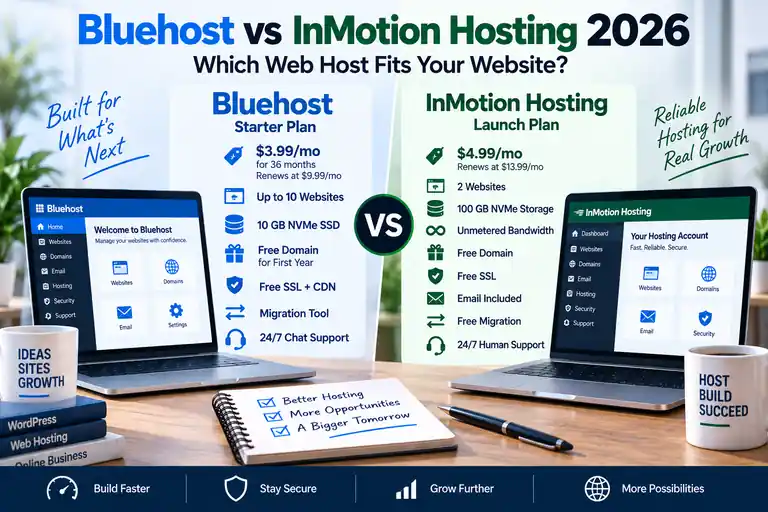
Bluehost and InMotion Hosting are both established web hosts, but they are built around different priorities.
Bluehost focuses heavily on simplified WordPress setup, beginner-friendly management and tools designed to help new website owners get online quickly. InMotion Hosting takes a more traditional hosting approach with cPanel, generous NVMe storage, bundled email, migration assistance and a stronger path into VPS and dedicated hosting.
For 2026, we prefer Bluehost for beginners and first-time WordPress users, while InMotion Hosting is our preferred option for small businesses and growing websites that value storage, cPanel and long-term hosting flexibility.
Compare Bluehost vs InMotion →
Quick answer: Choose Bluehost if you are building your first WordPress website and want simplified setup and beginner-friendly management. Choose InMotion Hosting if you want cPanel, 100GB of entry-level NVMe storage, domain email, free migration and a stronger path for a growing business website.
Hosting features, promotional pricing and renewal rates can change. Verify current plan details before purchasing.
Bluehost vs InMotion Hosting at a Glance
| Feature | Bluehost Starter | InMotion Launch |
|---|---|---|
| Best For | Beginners and first WordPress sites | Small businesses and growing sites |
| Intro Price* | $3.99/mo | $4.99/mo |
| Published Renewal* | $9.99/mo | $13.99/mo |
| Websites | 10 | 2 |
| Storage | 10GB NVMe | 100GB NVMe |
| Bandwidth | Plan limits apply | Unmetered |
| Free Domain | First year | Included on qualifying terms |
| SSL | Free | Free |
| Control Panel | Bluehost Portal + cPanel on applicable products | cPanel |
| Pro Email free trial / current email options | Unlimited email addresses | |
| Backups | Weekly backups on Starter | Backup options depend on configuration |
| Money-Back Period | 30 days | Up to 90 days |
*Promotional prices and renewal rates depend on term length and can change. Verify current pricing and plan terms before purchasing.
Bluehost vs InMotion Hosting Pricing
Bluehost currently has the lower entry price when comparing its Starter plan with InMotion Launch on their longer-term promotional offers.
Bluehost Starter
Bluehost Starter currently costs $3.99 per month on a 36-month term and renews at $9.99 per month on a 36-month renewal.
Starter currently includes:
- 10 websites
- 10GB NVMe storage
- Free domain for the first year
- Free SSL
- Free CDN
- Free site migration tool
- Managed WordPress updates
- Weekly website backups
- Free malware scanning
- Web application firewall
- DDoS protection
- WordPress staging
- AI site-creation tools
- 24/7 chat support
Best for: Beginners and first-time WordPress users who want lower entry pricing and guided website management.
See our Bluehost Pricing 2026 guide for its other plans and renewal terms.
InMotion Launch
InMotion Launch currently starts at $4.99 per month on its longer-term promotional offer and renews at $13.99 per month on that configuration.
Launch currently includes:
- 2 websites
- 100GB NVMe storage
- Unmetered bandwidth
- Unlimited email addresses
- 5GB storage per email inbox
- Free SSL
- Free domain on qualifying terms
- Website migration assistance
- cPanel
- Malware and DDoS protection
- Web application firewall
- Chat and ticket support
Best for: Small businesses and growing websites that value storage, cPanel, email and long-term hosting flexibility.
For a deeper breakdown, see our InMotion Hosting Pricing guide.
Which Gives You More for the Entry Price?
The answer depends on what you actually need from the hosting account.
Bluehost supports far more websites on its entry plan: 10 versus InMotion Launch's 2.
InMotion gives you dramatically more storage: 100GB NVMe versus Bluehost's 10GB NVMe.
For several relatively small sites, Bluehost's website allowance can be more valuable.
For one or two business websites with large media libraries, downloadable files or room to grow, InMotion's storage allocation can be more useful.
Winner for more websites: Bluehost.
Winner for storage: InMotion Hosting.
Bluehost vs InMotion Hosting for WordPress
Both providers support WordPress well, but their approaches are different.
Bluehost puts WordPress at the center of the hosting experience. Starter currently includes managed WordPress updates, staging, caching, a migration tool, weekly backups and AI-assisted site-creation tools.
InMotion can also host WordPress on its shared plans and offers separate WordPress hosting products with NVMe storage, caching and staging features.
For a first WordPress website, Bluehost has the advantage.
The onboarding and management experience is designed around helping less technical users get a WordPress site online quickly.
For a business owner who already understands hosting and wants a more traditional cPanel environment, InMotion can be the stronger fit.
Bluehost vs InMotion Hosting for Beginners
Bluehost is our winner for beginners.
Its Portal is designed to simplify website, domain and hosting management and reduce how much traditional hosting terminology a first-time user needs to understand.
InMotion uses cPanel more directly. cPanel is powerful and widely documented, but it exposes more traditional hosting-management tools from the beginning.
Someone building a first WordPress site may prefer Bluehost's guided approach.
Winner for beginners: Bluehost.
Bluehost vs InMotion Hosting for Small Business
InMotion Hosting is our preferred choice for a growing small-business website.
Its Launch plan includes 100GB NVMe storage, unlimited email addresses, cPanel, migration assistance, security features and a broader path into VPS and dedicated hosting.
Bluehost remains a good small-business option, especially for a new WordPress site, but InMotion's traditional hosting environment and upgrade path make it more attractive to businesses expecting their hosting needs to increase over time.
Winner for small business: InMotion Hosting.
Building a growing business website? InMotion's larger storage allocation, bundled email and traditional cPanel environment make it particularly strong for business hosting.
Bluehost vs InMotion Hosting: cPanel
InMotion Hosting has the advantage if a traditional cPanel environment is important to you.
Its shared-hosting plans use cPanel for tasks such as managing files, databases, domains and email accounts.
Bluehost provides cPanel access on applicable hosting products, but its own Portal is the primary management experience.
If you already know cPanel or want a standardized hosting interface, InMotion is the stronger fit.
Winner for cPanel: InMotion Hosting.
Bluehost vs InMotion Hosting Storage
InMotion has a substantial advantage in advertised storage at comparable shared-hosting tiers.
| Plan | Websites | NVMe Storage |
|---|---|---|
| Bluehost Starter | 10 | 10GB |
| Bluehost Business | 50 | 50GB |
| InMotion Launch | 2 | 100GB |
| InMotion Power | 10 | 200GB |
Storage winner: InMotion Hosting.
Bluehost's strength at the lower tier is the larger website allowance rather than raw storage capacity.
Bluehost vs InMotion Hosting Email
InMotion has the advantage for customers who want traditional domain email bundled directly with their hosting account.
Launch, Power and Pro currently include unlimited email addresses, with mailbox storage limits increasing by plan.
Bluehost currently promotes Pro Email as a separate email offering with a free trial on Starter rather than providing the same traditional unlimited-email structure.
Email winner: InMotion Hosting.
Bluehost vs InMotion Hosting Website Migration
Both providers offer migration options.
Bluehost currently includes a site migration tool aimed at moving WordPress websites.
InMotion offers no-downtime migration assistance across its shared-hosting plans.
For a simple WordPress migration, Bluehost's self-service approach can be convenient.
For users moving an established business site or coming from another traditional hosting environment, InMotion's migration assistance is particularly attractive.
Winner for migration assistance: InMotion Hosting.
Bluehost vs InMotion Hosting Security
Both providers include a useful baseline of security features.
Bluehost Starter currently includes free SSL, malware scanning, a web application firewall and DDoS protection.
InMotion's shared hosting includes free SSL, malware protection, DDoS protection and a web application firewall.
Neither host eliminates the need to maintain WordPress, plugins, themes and account security properly.
Winner: Very close.
Bluehost vs InMotion Hosting Backups
Bluehost currently has the clearer entry-level backup advantage.
Starter includes weekly website backups.
InMotion offers backup functionality and backup services, but the exact backup arrangement depends on the hosting configuration and should be checked before purchase.
Winner for included Starter backups: Bluehost.
Bluehost vs InMotion Hosting Customer Support
Both providers offer 24/7 support, but the support channels depend on the plan.
Bluehost Starter currently includes 24/7 chat support. Phone support is included on higher Bluehost plans rather than Starter.
InMotion Launch includes chat and ticket support, while Power and Pro add phone support.
Winner: Very close. Check the exact plan if phone support matters to you.
Bluehost vs InMotion Hosting Money-Back Guarantees
Bluehost currently provides a 30-day money-back guarantee.
InMotion advertises an up to 90-day money-back guarantee on qualifying shared-hosting plans.
Winner: InMotion Hosting.
Bluehost vs InMotion Hosting for Developers
InMotion deserves particular attention from users who want more than a simplified WordPress environment.
Its shared hosting includes traditional cPanel tools and support for development technologies such as Python, Node.js and Git.
Bluehost also provides tools such as SSH and WP-CLI on its WordPress plans, so it is not limited to beginners.
However, InMotion's overall environment is more naturally aligned with users who want traditional hosting control.
Winner for traditional developer flexibility: InMotion Hosting.
Who Should Choose Bluehost?
Choose Bluehost if you:
- Are building your first WordPress website
- Want a beginner-oriented hosting experience
- Need to host several relatively small websites
- Want weekly backups included on Starter
- Want WordPress staging
- Want AI-assisted website-building tools
- Prefer a simplified hosting-management dashboard
- Want the lower current entry and renewal price
Who Should Choose InMotion Hosting?
Choose InMotion Hosting if you:
- Run a small-business website
- Want much larger storage allocations
- Prefer traditional cPanel hosting
- Want domain email bundled with hosting
- Want assisted migration
- Value a longer money-back period
- Want a path into VPS or dedicated hosting
- Prefer a more traditional hosting environment
- Expect your website's resource needs to grow
Bluehost vs InMotion Hosting: Final Verdict
There isn't one universal winner because these providers are strongest for different types of customers.
Choose Bluehost if you are a beginner or launching your first WordPress website. Its lower current entry price, support for more websites on Starter, weekly backups, staging and simplified management make it easier to get started.
Choose InMotion Hosting if you run a small business or expect your website to grow. Its 100GB entry-level storage allocation, cPanel, unlimited email addresses, migration assistance and broader upgrade path make it particularly attractive for long-term business hosting.
Bottom line: Bluehost wins for beginner simplicity. InMotion wins for small-business hosting, storage, cPanel, email and long-term flexibility.
Bluehost vs InMotion Hosting FAQ
Is Bluehost better than InMotion Hosting?
Bluehost is our preference for beginners and first-time WordPress users. InMotion Hosting is our preference for small businesses and growing sites that prioritize cPanel, storage, email and long-term flexibility.
Which is cheaper, Bluehost or InMotion Hosting?
On the entry plans compared here, Bluehost currently has the lower long-term introductory and published renewal price. Promotional pricing changes, so always compare the term length, upfront cost and renewal rate before purchasing.
Which is better for WordPress?
Both support WordPress well. Bluehost has the edge for first-time WordPress users because of its simplified onboarding, staging, backups and WordPress-focused tools.
Which is better for beginners?
Bluehost. Its management experience is designed to simplify hosting for first-time website owners.
Which is better for small business?
We prefer InMotion Hosting for growing small businesses because it includes far more entry-level storage, bundled email, cPanel, migration assistance and a stronger path into VPS and dedicated hosting.
Which has more storage?
InMotion Hosting has the clear advantage on the entry plans compared here, with 100GB NVMe on Launch versus 10GB NVMe on Bluehost Starter.
Which is better for cPanel?
InMotion Hosting. Its shared hosting is centered around a traditional cPanel environment, while Bluehost emphasizes its own management Portal.
Which has the better money-back guarantee?
InMotion Hosting offers up to 90 days on qualifying shared-hosting plans, compared with Bluehost's 30-day guarantee.
Pricing and feature note: Hosting prices, promotional terms, renewal rates and included features can change. Verify current plan details before purchasing.
Affiliate disclosure: WebHostRanking may receive compensation if you purchase Bluehost or InMotion Hosting through links on this page. This does not increase the price you pay.