
How to Sell Products Online in 2026: Step-by-Step Guide
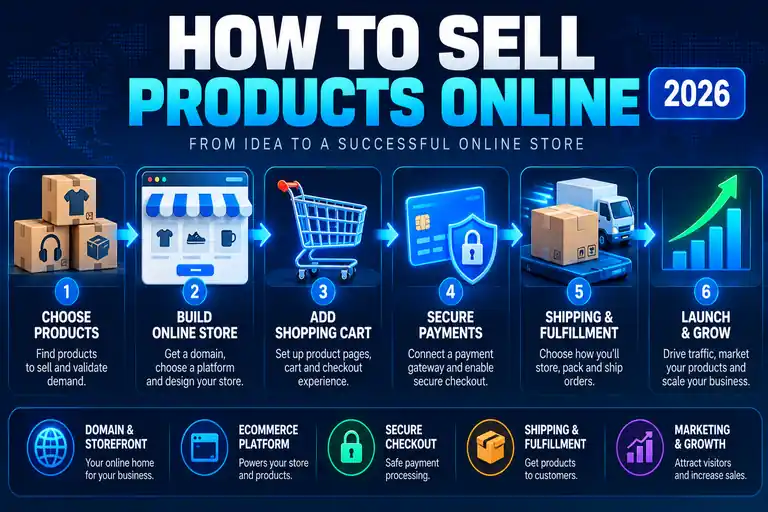
Selling products online requires more than putting a few items on a website. You need a storefront, ecommerce software, product pages, a shopping cart, secure payment processing and a way to deliver what customers purchase.
The good news is that modern ecommerce platforms combine much of this technology, making it possible for a small business to launch an online store without developing a shopping system from scratch.
This guide walks through the process from choosing what to sell to launching the store and attracting your first customers.
Quick Answer: To sell products online, choose what you'll sell, secure a domain, build an ecommerce store, add your products, configure your shopping cart and payment processing, set up shipping or delivery, test the checkout process and then market your store.
Selling products online requires more than putting a few items on a website. You need a storefront, ecommerce software, product pages, a shopping cart, secure payment processing and a way to deliver what customers purchase.
The good news is that modern ecommerce platforms combine much of this technology, making it possible for a small business to launch an online store without developing a shopping system from scratch.
This guide walks through the process from choosing what to sell to launching the store and attracting your first customers.
How to Sell Products Online
Quick Answer: The basic process is to choose a product, select an ecommerce platform, register a domain, build your storefront, create product pages, configure payments and shipping, test the entire checkout process and launch your store.
Before building your website, decide what you want to sell and how you'll fulfill customer orders. The technical side of ecommerce becomes much easier once you know what products you're offering and how customers will receive them.
- Choose the products you want to sell.
- Choose an ecommerce platform or hosting solution.
- Register your domain name.
- Build your online storefront.
- Create your product pages.
- Set up a shopping cart.
- Connect secure payment processing.
- Configure shipping, pickup or digital delivery.
- Test your checkout process.
- Launch and market your store.
1. Decide What You Want to Sell Online
Your first decision is what type of product you'll sell. Online stores can sell physical products, digital products, services, subscriptions or a combination of these.
The type of product matters because it affects the ecommerce features you'll need. A store selling physical merchandise needs inventory and shipping tools, while a digital-product business needs a reliable way to deliver downloadable files after payment.
Before choosing ecommerce software, think about your product catalog, pricing, inventory, fulfillment and whether you expect the business to grow significantly over time.
2. Choose an Ecommerce Platform
Quick Answer: Choose an ecommerce platform based on the products you're selling, your technical experience, budget and how much control you want over the store. The platform should support product management, a shopping cart, secure checkout and the payment methods you plan to accept.
Your ecommerce platform provides the technology behind your online store.
Depending on the platform, it may handle your storefront, product catalog, shopping cart, checkout, payment integrations, inventory and order management from one dashboard.
Some businesses prefer an all-in-one hosted ecommerce platform, while others build a WordPress website and add ecommerce functionality.
WordPress users commonly add shopping-cart and ecommerce software to turn an ordinary website into an online store. Our WordPress Shopping Cart Review explains this approach in more detail.
3. Register a Domain Name
Your domain is the web address customers use to reach your store.
Choose a domain that is easy to remember, easy to spell and closely connected to your business or brand. Avoid making it unnecessarily long or difficult for customers to type.
Some ecommerce platforms and web-hosting plans allow you to register a domain during setup. Depending on the hosting package, domain registration may also be included for an introductory period.
4. Build Your Online Store
Your storefront should make it easy for customers to understand what you sell and find the products they're looking for.
A typical ecommerce website includes a homepage, product categories, individual product pages, shopping cart, checkout, contact information and important store policies.
Keep navigation simple. Customers shouldn't have to search through multiple menus just to find your products or reach checkout.
5. Create Product Pages That Help Customers Buy
Quick Answer: A strong product page should clearly show what the product is, what it costs and why someone should buy it. Include useful photos, an accurate description, price, options or variations, availability and a clear Add to Cart button.
Product pages are where shoppers decide whether to buy.
Each page should give customers enough information to make that decision without forcing them to contact you for basic details.
A useful product page typically includes:
- Clear product name
- High-quality product images
- Accurate description
- Price
- Sizes, colors or other variations when applicable
- Inventory or availability information
- Shipping or delivery information
- Clear Add to Cart button
Write product descriptions for customers rather than simply copying manufacturer descriptions. Explain what the product does, who it's for and the information someone needs before purchasing.
6. Set Up Your Shopping Cart
Quick Answer: Your shopping cart should let customers add products, change quantities, remove items, see their order total and move into checkout without unnecessary steps or confusion.
The shopping cart connects your product pages to the checkout process.
Customers should be able to add products to their cart, review what they've selected, change quantities and see the cost of their order before paying.
A complicated cart creates opportunities for shoppers to leave before completing their purchase. Keep the path from product page to checkout as straightforward as possible.
7. Accept Payments Online
Quick Answer: To accept payments online, connect your ecommerce store to a supported payment processor or gateway. Your checkout should use HTTPS and securely process the payment methods you choose to offer customers.
Your store needs a secure way to collect customer payments.
Modern ecommerce platforms generally integrate with payment processors that allow businesses to accept credit cards and other supported payment methods without building their own payment system.
The payment options available to you depend on your ecommerce platform, business location and payment provider.
Security is especially important at checkout. Your website should use HTTPS, and payment information should be processed through properly configured payment services rather than collected insecurely by your website.
For more information about the payment side of ecommerce, see our Shopping Cart Payment guide.
8. Set Up Shipping or Product Delivery
Quick Answer: Physical-product stores need shipping, local delivery or pickup rules, while digital-product stores need automated file or account delivery. Make these costs and options clear before the customer completes checkout.
How you deliver an order depends on what you're selling.
Physical-product businesses may need to configure shipping rates, free-shipping thresholds, local pickup or local delivery. You'll also need a process for packaging orders and getting them to customers.
Digital products don't require physical shipping, but customers still need a reliable way to receive their purchase after payment.
Whatever method you use, make delivery costs and expectations clear before the customer completes checkout.
9. Test Your Ecommerce Checkout
Never assume the store works simply because the product pages look correct.
Test the entire buying process as though you were a customer.
Check:
- Product links and buttons
- Add to Cart functionality
- Product quantities and variations
- Discounts or promotional codes if used
- Shipping calculations
- Taxes when applicable
- Payment processing
- Order confirmation pages
- Confirmation emails
- Mobile checkout
- Digital delivery if applicable
Fixing checkout problems before launch is much easier than discovering them after customers begin trying to place orders.
10. Launch and Market Your Online Store
Launching the website doesn't automatically bring customers.
Once the store is working, you'll need to attract potential buyers through channels that make sense for your products and audience.
That can include search engine optimization, social media, email marketing, paid advertising, content marketing and existing customer relationships.
Focus first on the channels where your likely customers already spend their time rather than trying to market everywhere at once.
How Much Does It Cost to Sell Products Online?
Quick Answer: The cost of selling online depends on your domain, hosting or ecommerce platform, payment-processing fees, website design, apps or plugins, marketing and shipping. A simple store can start relatively inexpensively, while a larger custom ecommerce operation can cost substantially more.
There isn't one fixed cost for starting an online store.
Your expenses can include:
- Domain registration
- Web hosting or ecommerce platform fees
- Ecommerce software, themes or plugins
- Payment-processing fees
- Premium apps or extensions
- Website design or development
- Product photography
- Inventory
- Packaging and shipping
- Advertising and marketing
A small store using an existing ecommerce platform can cost much less to launch than a completely custom ecommerce website.
Compare the ongoing cost as well as the initial price. Hosting, platform subscriptions, payment fees and premium ecommerce tools can continue for as long as you operate the store.
Do You Need Web Hosting to Sell Products Online?
Quick Answer: Your ecommerce store needs to be hosted somewhere, but whether you purchase hosting separately depends on the platform. Hosted ecommerce services include the hosting infrastructure, while a self-hosted WordPress store requires a web-hosting plan.
If you build a self-hosted ecommerce website, choosing the right web host is an important part of the setup process.
An online store places different demands on hosting than a simple informational website. Product pages, customer accounts, shopping carts and checkout activity can require additional resources as the store grows.
Look for hosting that provides SSL, dependable uptime, backups, security features and enough resources for your expected store traffic.
Can You Sell Products Online With WordPress?
Quick Answer: Yes. WordPress can be turned into an ecommerce store by adding compatible ecommerce software. This approach gives you control over your website while adding product pages, a shopping cart, checkout and payment functionality.
WordPress itself is a content-management system, but ecommerce software can add the functionality needed to sell products online.
This can be a good option for businesses that want control over their website and plan to combine ecommerce with blogging, content marketing or other WordPress features.
The right setup depends on the products you're selling, the size of your store and how much technical management you're comfortable handling.
Common Mistakes When Selling Products Online
Many ecommerce problems aren't caused by the products themselves. They're caused by making it unnecessarily difficult for customers to shop.
Common mistakes include:
- Using poor-quality product photos
- Writing incomplete product descriptions
- Hiding shipping costs until the end of checkout
- Making checkout unnecessarily complicated
- Ignoring mobile shoppers
- Offering too few payment options for your audience
- Failing to test checkout
- Having unclear return or refund policies
- Launching without a plan to attract customers
Reducing friction throughout the buying process can make it easier for shoppers to complete their orders.
Our guide to reducing shopping cart abandonment covers ways to improve the checkout experience.
Selling Products Online: Bottom Line
Quick Answer: You don't need to build ecommerce technology from scratch to start selling online. Choose the right platform, create useful product pages, make checkout and payment simple, clearly explain delivery costs and test the entire buying process before launch.
Selling products online is much easier when you break the process into individual steps.
Start with the products and the needs of your customers. Then choose ecommerce technology that gives you the storefront, shopping cart, payment and delivery features necessary to complete a sale.
Once the store is built, test everything before launch and focus on making the buying process as simple as possible for customers.