
Bluehost AI Website Builder Review 2026: Is It Easy to Use?
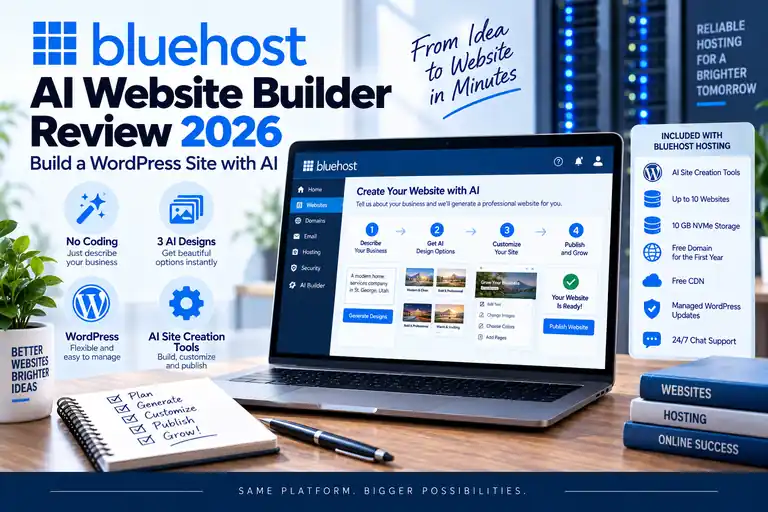
Bluehost is no longer just giving customers hosting and asking them to figure out how to build the website themselves.
Quick Answer: Bluehost's AI website-building tools can make starting a WordPress website considerably easier for beginners. You can describe the type of website you want, use AI to help create an initial design and then continue customizing the site in WordPress. The biggest advantage is that you aren't locked into a proprietary AI website builder—you still end up with a WordPress website you can edit and expand.
Bluehost's current AI website-building tools are designed to take information about your business or website idea and help generate an initial WordPress site rather than making you start from a blank installation.
In this Bluehost AI Website Builder review for 2026, we'll look at how the AI tools work, what they can create, how much control you retain, where their limitations are and whether they actually make starting a WordPress website easier.
Hosting features, AI tools, promotional pricing and plan configurations can change. Verify current plan details before purchasing.
What Is the Bluehost AI Website Builder?
Bluehost's AI website-building tools are designed to help you create the starting point for a website without beginning with an empty WordPress installation.
You provide information about the website you want to build, such as:
- Your website or business name
- The type of website you're creating
- A description of your business or idea
- Your logo, if you already have one
- Your design preferences
Bluehost then uses that information to help generate a starting design that you can customize.
The important distinction is that Bluehost's WordPress AI Builder helps create a WordPress website rather than replacing WordPress with an entirely separate proprietary platform.
That gives beginners the convenience of AI-assisted setup while retaining the flexibility of WordPress afterward.
How Does Bluehost's AI Website Builder Work?
The basic Bluehost AI website-building process is straightforward:
| Step | What Happens |
|---|---|
| 1 | Choose your Bluehost hosting and website setup |
| 2 | Describe your website, business or idea |
| 3 | Add your branding and design preferences |
| 4 | Review AI-generated website options |
| 5 | Customize the website in WordPress |
| 6 | Review and publish your finished site |
The goal isn't to remove WordPress. It's to remove much of the work involved in getting from a new hosting account to a usable starting website.
Step 1: Choose Your Bluehost Hosting
If you're using Bluehost's WordPress AI tools through a hosting account, you'll first need a hosting plan for the finished website.
For a first website, Starter is the Bluehost plan we'd look at first unless you specifically need the additional storage, capacity or features of a higher tier.
Current Starter features include:
- Up to 10 websites
- 10 GB NVMe storage
- AI site-creation tools
- Free domain for the first year on eligible plans
- Free SSL
- CDN
- Managed WordPress updates
- Website migration functionality
- Weekly website backups
- WordPress staging
- 24/7 chat support
Because Bluehost uses introductory pricing, compare both the initial cost and eventual renewal rate before choosing a plan.
See our Bluehost Pricing 2026 guide for the complete pricing breakdown.
Step 2: Tell Bluehost What You're Building
This is where the AI functionality becomes useful.
Instead of starting with a blank website and trying to decide what every page should look like, you provide information about the type of site you want to create.
For example, you might describe:
- A local plumbing company
- A real estate website
- A landscaping business
- A personal blog
- A consulting company
- A restaurant
- A portfolio
The more accurately you describe your business, audience and website purpose, the better context you're giving the AI tools for the initial design.
Step 3: Add Your Branding
If you already have a logo, you can incorporate it into the setup process.
If you don't have your complete branding figured out yet, you can still get started and refine the visual identity later.
That's useful for new businesses and first-time website owners who may be developing their website and brand at the same time.
We wouldn't let AI-generated branding automatically become the permanent identity of a serious business without reviewing it carefully. Use the generated result as a starting point and make sure the final design actually represents your company.
Step 4: Generate the Website
Bluehost uses the information you provide to generate potential starting designs for the website.
The generated starting point can help establish elements such as:
- Page layout
- Fonts
- Colors
- Images
- Starting content
- Website sections
This addresses one of the biggest problems first-time WordPress users face: staring at a blank website and having no idea where to begin.
Instead of designing every element from scratch, you have something tangible to review, change and improve.
Step 5: Customize the AI-Generated Website
You don't have to accept the generated website exactly as AI creates it.
That's one of the most important things to understand about Bluehost's approach.
The generated design is a starting point. You can continue changing the site and working with it through WordPress.
This gives you considerably more flexibility than an AI builder that locks the entire website into a closed proprietary platform.
Step 6: Review Before Publishing
Don't publish an AI-generated website without reviewing it carefully.
Check:
- Business name and contact information
- Service descriptions
- Images
- AI-generated text
- Navigation
- Mobile layout
- Contact forms
- Page titles and SEO settings
- Legal and privacy pages
- Calls to action
AI-generated content can sound convincing while still being generic, inaccurate or inappropriate for your particular business.
The AI builder should save you time. It shouldn't replace your responsibility to verify what the website says before customers see it.
Is the Bluehost AI Website Builder Really WordPress?
Yes. Bluehost's WordPress AI Builder creates a WordPress website.
This is one of its biggest advantages.
WordPress gives you access to a broad ecosystem of themes, plugins and website-management tools. You're using AI to accelerate the initial setup without giving up WordPress as the underlying content-management system.
For someone who wants an easier starting point but doesn't want to be permanently tied to a closed website builder, that's a compelling combination.
For more on the hosting platform itself, see our Bluehost WordPress Hosting Review 2026.
What Can Bluehost's AI Tools Actually Do?
The AI-assisted workflow can help with tasks such as:
- Generating an initial website design
- Creating starting layouts
- Suggesting website sections
- Generating initial content
- Helping select fonts and colors
- Providing branding assistance
- Giving beginners an easier starting point for customization
The practical benefit is speed.
Instead of researching themes, deciding how every page should be structured and assembling the entire initial design yourself, AI can create something you can immediately begin refining.
Do You Need to Know How to Code?
No. You don't need coding experience to get started with Bluehost's AI website-building tools.
You can describe the website you want and then customize the generated result using WordPress and visual editing tools.
Knowing HTML or CSS can eventually be useful for more advanced customization, but it isn't required to create a basic website.
This is one reason the AI builder fits particularly well with the beginner audience Bluehost already serves.
See our Bluehost for Beginners 2026 guide if this will be your first website.
How Much Does the Bluehost AI Website Builder Cost?
Bluehost's WordPress AI site-creation functionality is available as part of its website and WordPress hosting experience rather than requiring beginners to assemble a completely separate website-building platform.
The more important cost for most users is therefore the Bluehost hosting plan that keeps the finished WordPress website online.
Because hosting prices, promotions and AI offerings can change, verify the current plan terms and included AI features before purchasing.
Bluehost AI Builder vs Traditional WordPress Setup
| Bluehost AI Builder | Traditional WordPress Setup |
|---|---|
| AI helps create starting design | You choose and configure the initial design |
| Can generate starting content | You create initial content manually |
| Design guidance provided | You research themes and layouts yourself |
| Faster starting point | More decisions required at the beginning |
| Still uses WordPress | Uses WordPress |
The biggest difference is speed and guidance, not necessarily the underlying website platform.
Does AI Mean Your Website Is Finished?
No.
This is probably the biggest misconception about AI website builders.
AI can create a useful starting point, but it doesn't know your business as well as you do. It doesn't automatically understand your customers, competitive advantages, local market, conversion goals or SEO strategy.
You'll still need to review and improve the site.
For a small business in particular, replace generic content with accurate information about your actual services, service area, experience and reasons customers should choose you.
Is Bluehost's AI Website Builder Good for SEO?
An AI-generated website isn't automatically optimized for search engines simply because AI created it.
You still need to think about:
- Search intent
- Page titles
- Meta descriptions
- Useful original content
- Internal linking
- Image alt text
- Website speed
- Mobile usability
- Local SEO when applicable
The AI builder can accelerate the website-design process. It doesn't eliminate the need to create a useful website that deserves to rank.
Bluehost AI Website Builder for Small Business
The AI builder can be particularly useful for small-business owners who need a website but don't have a dedicated designer.
A contractor, consultant, real estate professional or local service business could use the AI tools to establish an initial site structure and then customize it with real business information, photos, services and calls to action.
That can significantly reduce the friction involved in starting from an empty WordPress installation.
If you're specifically building a company website, see our Bluehost for Small Business 2026 guide.
Bluehost AI Website Builder Pros and Cons
| Pros | Cons |
|---|---|
| Fast starting point for a new website | AI-generated content still needs careful review |
| WordPress-based | Generated designs should be customized for your brand |
| No coding required to get started | Hosting still has an ongoing cost |
| Reduces blank-page setup work | WordPress still has a learning curve |
| Website remains customizable | AI doesn't replace website, SEO or business strategy |
Who Is the Bluehost AI Website Builder Best For?
We think it makes the most sense for people who want a website but don't want to begin with a blank WordPress installation.
That includes:
- First-time website owners
- Local businesses
- Bloggers
- Freelancers
- Consultants
- Service businesses
- Side-hustle websites
- Small businesses without a web designer
The strongest use case is someone who wants WordPress but needs help getting through the initial design and setup stage.
Who Might Not Need Bluehost's AI Builder?
An experienced WordPress developer who already has a preferred theme, page builder and development workflow may not gain much from having AI generate the initial design.
Similarly, a business requiring highly customized functionality may still need a designer or developer regardless of how the initial pages are created.
The AI builder is most valuable when speed and ease of getting started are the problems you're trying to solve.
What If You Already Have a WordPress Website?
If you already have a WordPress website, you generally don't need to use an AI builder to recreate it from scratch.
Instead, Bluehost provides website migration functionality that can help move an existing WordPress website into the hosting account.
That allows you to preserve the website you've already built rather than replacing it simply because you're changing hosting companies.
Bluehost AI Website Builder FAQ
Does Bluehost have an AI website builder?
Yes. Bluehost offers AI-assisted website creation designed to help users generate an initial website based on information about the site or business they want to create.
Does Bluehost's AI Builder use WordPress?
Bluehost's WordPress AI Builder creates a WordPress website. This allows you to continue editing and expanding the site through WordPress after the initial AI-assisted setup.
Do I need coding experience to use it?
No. The AI-assisted setup is particularly useful for people without coding or web-development experience.
Can I edit the website after AI creates it?
Yes. The generated website is intended to be customized rather than treated as an unchangeable finished product.
Will Bluehost AI write my website content?
AI can help generate starting content, but you should review and rewrite it where necessary. Never assume automatically generated information about your business is accurate.
Is an AI-generated Bluehost site automatically optimized for Google?
No. You still need useful content, appropriate page titles, good website structure, performance optimization and other SEO work. AI can speed up site creation, but it doesn't guarantee search rankings.
Is Bluehost's AI Website Builder good for beginners?
Yes. Beginners are one of the strongest use cases because AI can remove much of the blank-page problem that new WordPress users encounter when building their first website.
Is the Bluehost AI Website Builder Worth Using?
Yes, particularly if you're already considering Bluehost and you're building a new WordPress website.
The main benefit isn't that AI magically produces a perfect finished website.
The benefit is that it can turn an empty WordPress installation into an editable starting website much faster.
You still retain responsibility for reviewing the content, improving the design, adding accurate business information and making sure the finished site accomplishes what you need it to do.
For an experienced WordPress developer, the AI tools may be unnecessary. But for a beginner, blogger or small-business owner who wants WordPress without having to design everything from scratch, Bluehost's AI website-building tools add meaningful value to the hosting experience.
Affiliate Disclosure: WebHostRanking.com may receive compensation if you purchase Bluehost through links on this page. This does not increase the price you pay. Bluehost's AI tools, hosting features, promotional pricing and plan configurations can change, so verify current details before purchasing.