
Bluehost vs Namecheap 2026: Which Web Host Is Better for You?
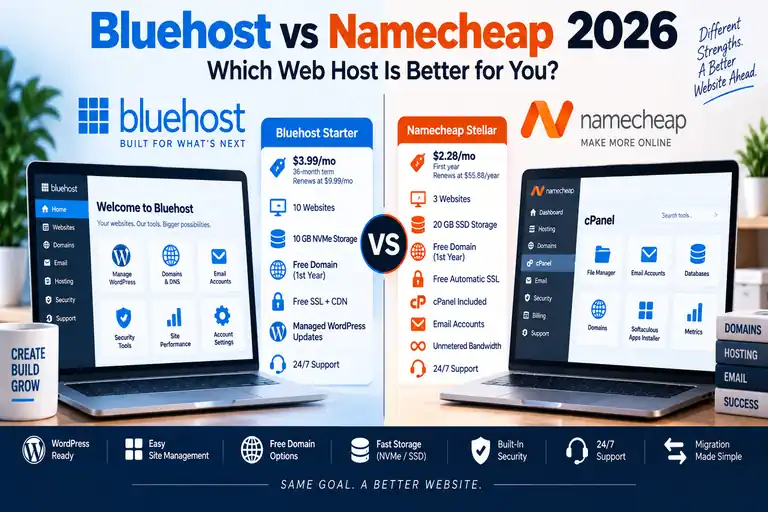
Bluehost and Namecheap both offer affordable website hosting, but they're built around somewhat different priorities.
Bluehost emphasizes an integrated, beginner-friendly WordPress experience, while Namecheap combines low-cost traditional shared hosting with cPanel, email and flexible multi-site plans.
In this Bluehost vs Namecheap comparison for 2026, we'll compare current pricing, renewals, WordPress tools, cPanel, storage, email, backups, security and support so you can see where each provider differs.
Bluehost and Namecheap are both established hosting companies, but choosing between them isn't simply a matter of finding the lower introductory price.
The two providers take noticeably different approaches to shared hosting.
Bluehost's current hosting platform places WordPress, website management, security and hosting tools inside its own Bluehost Portal while still providing cPanel access on applicable plans.
Namecheap's shared hosting is more traditionally cPanel-centered and puts a particularly strong emphasis on low pricing, multiple websites and bundled domain-based email.
That makes this comparison especially useful for beginners, budget-conscious website owners and anyone deciding whether they want a highly integrated WordPress experience or more traditional cPanel hosting.
Bluehost vs Namecheap at a Glance
| Feature | Bluehost | Namecheap |
|---|---|---|
| Entry Shared Hosting* | $3.99/mo | $2.28/mo |
| Entry Renewal* | $9.99/mo on 36-month renewal | $55.88/year |
| Entry Websites | Up to 10 | Up to 3 |
| Entry Storage | 10 GB NVMe SSD | 20 GB SSD |
| Control Panel | Bluehost Portal + cPanel on applicable hosting | cPanel |
| Free SSL | Yes | Yes |
| Free Migration | Migration tool | Yes |
| WordPress | Managed updates + staging + AI tools | WordPress via Softaculous + AI tools |
| Support | 24/7 chat; phone varies by plan | 24/7 live chat |
*Pricing reflects publicly advertised U.S. rates checked in September 2026. Promotional pricing, term lengths and renewal rates can change.
Bluehost vs Namecheap Pricing
Price is one of the clearest differences between these hosts.
Bluehost Starter
Bluehost's current Starter plan is advertised at $3.99 per month on a 36-month term and renews at $9.99 per month on another 36-month term.
Starter currently includes:
- Up to 10 websites
- 10 GB NVMe SSD storage
- Free domain for the first year
- Free SSL
- Free CDN
- Free migration tool
- Managed WordPress updates
- WordPress staging
- Weekly website backups
- Malware scanning
- 24/7 chat support
For a full breakdown of Bluehost's plans and renewal costs, see our Bluehost Pricing 2026 guide.
Namecheap Stellar
Namecheap's current Stellar shared-hosting promotion is $2.28 per month for the first year.
Namecheap's published renewal rate for Stellar is currently $55.88 per year, which works out to roughly $4.66 per month when divided across the year.
Stellar currently includes:
- Up to 3 websites
- 20 GB SSD storage
- Unmetered bandwidth
- 30 email accounts
- cPanel
- Free automatic SSL
- WordPress installation through Softaculous
- Website builder options
- Free migration
- 24/7 live chat support
Namecheap also currently offers a 30-day shared-hosting trial for eligible accounts.
Which Has Lower Long-Term Hosting Costs?
Namecheap's current shared-hosting renewal pricing is substantially lower than Bluehost Starter's published 36-month renewal rate.
That's worth considering if keeping recurring hosting costs low is one of your highest priorities.
Bluehost bundles a different mix of WordPress-management, staging, caching and website-management tools, so price alone doesn't make the products identical.
Compare what you actually need rather than simply selecting whichever monthly number is smallest.
Bluehost vs Namecheap for WordPress
Both hosts can run WordPress, but the experience is different.
Bluehost's current WordPress offering is more tightly integrated into its hosting platform.
Starter includes managed WordPress updates, a staging environment, migration tools, caching, AI site-creation tools and other WordPress-focused features.
Namecheap's shared hosting gives you cPanel and Softaculous, which can install WordPress quickly and provide a more traditional hosting experience.
Namecheap has also added AI for WordPress to its current shared-hosting plans.
Users who want more WordPress-specific management can also consider Namecheap's separate EasyWP managed WordPress product.
For a closer look at Bluehost's WordPress experience, read our Bluehost WordPress Hosting Review 2026.
Bluehost vs Namecheap for Beginners
Bluehost puts considerable effort into reducing the number of technical hosting decisions a new website owner needs to make.
The Bluehost Portal provides a central interface for websites, domains and hosting tools, and its WordPress setup process guides new users through creating a site.
Namecheap isn't difficult to use, but its shared-hosting experience is more traditionally centered around cPanel.
For someone who wants to learn or already understands cPanel, that can actually be an advantage.
For someone who has never owned a website, Bluehost's more integrated WordPress workflow may feel more approachable.
See our Bluehost for Beginners 2026 guide for the complete setup process.
Bluehost vs Namecheap cPanel
This is one of Namecheap's strongest differentiators.
Namecheap shared hosting uses cPanel as its core hosting-management interface.
Its current cPanel environment includes tools for:
- File management
- Domains
- DNS
- MySQL databases
- SSL
- Backups
- Softaculous
- PHP
- Cron jobs
Bluehost also provides cPanel on applicable hosting products, but the Bluehost Portal serves as the primary account interface.
If traditional cPanel hosting is specifically what you want, Namecheap provides a very straightforward implementation.
Our Bluehost cPanel Guide 2026 explains how Bluehost's Portal and cPanel work together.
Storage and Website Limits
At the entry level, the comparison is interesting.
Bluehost Starter currently supports up to 10 websites but provides 10 GB of NVMe storage.
Namecheap Stellar supports only 3 websites but provides 20 GB SSD storage.
Moving to Namecheap Stellar Plus changes the equation significantly because it currently supports unlimited websites and advertises unmetered SSD storage, subject to Namecheap's hosting policies and resource limits.
Bluehost Business currently supports up to 50 websites with 50 GB NVMe storage.
Bluehost vs Namecheap Email
Namecheap has a notable advantage for buyers who want traditional domain-based email bundled into shared hosting.
Namecheap's current Stellar plan includes up to 30 email accounts, while Stellar Plus and Stellar Business list unlimited mailboxes subject to the hosting plan's terms and limits.
Bluehost's current hosting lineup handles email differently and also promotes separate email products and trials.
If having many traditional cPanel mailboxes bundled directly into inexpensive shared hosting is important, pay close attention to Namecheap's current plan structure.
Backups
Both providers offer backup functionality, but the exact implementation varies by plan.
Bluehost
Bluehost Starter currently lists weekly website backups.
Higher Bluehost plans provide additional backup and security features.
Namecheap
Namecheap's AutoBackup system is available on Stellar Plus and Stellar Business.
Namecheap says AutoBackup currently provides access to 6 daily, 3 weekly and 5 monthly backups for supported plans.
That can be a useful feature if you're considering Stellar Plus rather than entry-level Stellar.
Regardless of the host, we recommend maintaining your own independent copy of an important site. See our website backup guide.
Security
Both providers include baseline website-security features.
Bluehost Starter currently includes free SSL, malware scanning, malware detection/removal, a web application firewall and DDoS protection.
Namecheap's current shared-hosting lineup includes automatic SSL installation and security tools, with ImunifyAV on Stellar and Stellar Plus and the more advanced Imunify360 scanner on Stellar Business.
Hosting security is only one layer. WordPress plugins, passwords, updates and administrator practices still matter.
Our website security guide covers those additional steps.
Website Migration
Both companies currently provide ways to migrate an existing website.
Bluehost offers its self-service WordPress migration tool for moving an existing WordPress site into the Bluehost environment.
Namecheap currently advertises free website migration for new hosting plans and says its team can handle eligible transfers.
If you're moving specifically to Bluehost, our How to Migrate WordPress to Bluehost guide walks through the process.
Customer Support
Both hosts provide round-the-clock support, but available channels differ.
Bluehost Starter currently includes 24/7 chat support, while higher plans such as Business add phone support.
Namecheap advertises 24/7 live chat support for its shared-hosting customers.
If phone support matters to you, compare the exact Bluehost tier you're purchasing rather than assuming it is included with every plan.
Bluehost Strengths
- Beginner-oriented WordPress setup
- Managed WordPress updates
- WordPress staging
- NVMe storage
- Free domain for the first year
- Free CDN
- Integrated Bluehost Portal
- Clear upgrade path into WooCommerce, VPS and other hosting products
Namecheap Strengths
- Low current shared-hosting prices
- Lower published entry-plan renewal cost
- Traditional cPanel environment
- Domain-based email accounts included
- 20 GB storage even on Stellar
- Unlimited websites on Stellar Plus and Business
- AutoBackup on Stellar Plus and Business
- 30-day shared-hosting trial
When Bluehost Makes More Sense
Bluehost is worth considering when your priority is an integrated WordPress hosting experience.
It can be particularly appealing to:
- First-time WordPress users
- Bloggers
- Small businesses
- Users who want managed WordPress updates
- Users who want staging built into the hosting environment
- Businesses expecting to grow into more advanced Bluehost products
When Namecheap Makes More Sense
Namecheap is worth considering when inexpensive traditional shared hosting is the priority.
It can be particularly appealing to:
- Budget-focused website owners
- cPanel users
- People hosting multiple small websites
- Users who want multiple domain-based email accounts
- Developers comfortable with traditional shared hosting
- Website owners prioritizing lower published renewal costs
Bluehost vs Namecheap: Which Should You Choose?
Bluehost and Namecheap serve overlapping customers, but their strengths are different.
Bluehost provides a more integrated WordPress-focused hosting experience with managed updates, staging, migration tools, NVMe storage and a beginner-oriented Portal.
Namecheap emphasizes inexpensive traditional shared hosting with cPanel, bundled email and particularly attractive multi-site capabilities on Stellar Plus.
The decision therefore depends less on which company is universally “better” and more on what you're trying to accomplish.
If you're launching your first WordPress website and want more of the WordPress-management process built into the hosting platform, Bluehost is a strong option to consider.
If your priority is keeping shared-hosting costs down while getting cPanel, email and the ability to host multiple sites, Namecheap deserves serious consideration.
Hosting prices, promotions and plan features can change. Pricing in this comparison was checked against Bluehost and Namecheap's published U.S. information in September 2026. Verify current introductory and renewal terms before purchasing.