
VPS vs Shared Hosting 2026: What’s the Difference?
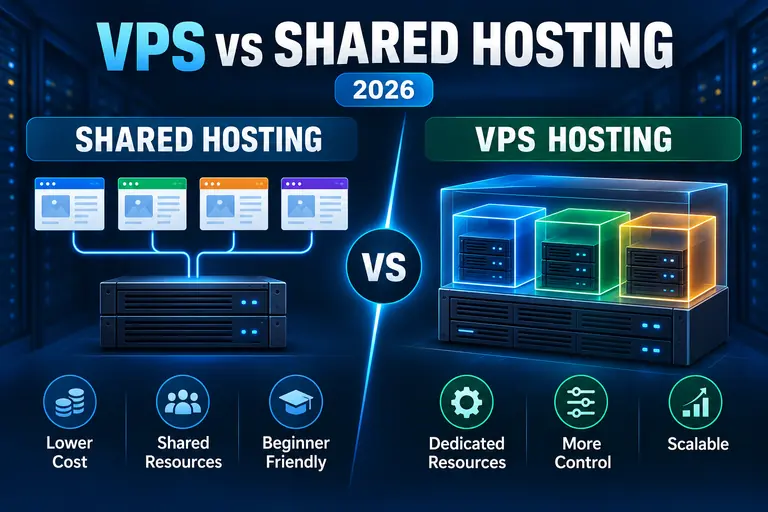
Shared hosting and VPS hosting can both run websites successfully, but they provide very different levels of resources, control and scalability.
Shared hosting keeps costs low by placing multiple customers in a managed server environment where resources are shared. A VPS uses virtualization to provide an isolated environment with allocated CPU, RAM and storage.
For a new or relatively simple website, shared hosting may be all you need. A growing business, ecommerce store or resource-intensive website may eventually benefit from moving to VPS hosting.
Compare VPS vs Shared Hosting →
Quick answer: Shared hosting is usually the simpler and less expensive starting point. VPS hosting provides allocated resources, greater server control and more room to scale. Upgrade when shared hosting's resource or configuration limits are getting in the way of your website.
The biggest difference between shared hosting and VPS hosting is how the server environment and its resources are allocated.
With shared hosting, multiple hosting accounts operate on the same server infrastructure and share available resources. With a Virtual Private Server (VPS), virtualization divides a physical server into separate virtual environments with resources allocated to each VPS.
That difference affects performance consistency, server access, customization, scalability and price.
VPS vs Shared Hosting at a Glance
| Feature | Shared Hosting | VPS Hosting |
|---|---|---|
| Resources | Shared among hosting accounts | Resources allocated to your VPS |
| Cost | Generally lower | Generally higher |
| Server Control | Limited | Greater control; root access may be available |
| Technical Skill | Beginner friendly | Varies between managed and self-managed VPS |
| Scalability | Suitable until account limits become restrictive | Designed for greater resource scalability |
| Customization | Provider controls server environment | Greater ability to customize server software and configuration |
| Typical Use | New sites, blogs and smaller business websites | Growing sites, ecommerce, applications and demanding workloads |
What Is Shared Hosting?
Shared hosting places multiple customer accounts on the same physical server and allows them to share the underlying server resources.
The hosting company manages the server itself, including much of the underlying hardware, operating environment and routine server administration.
This makes shared hosting relatively simple to use. You generally don't need to configure an operating system or administer a server before launching a website.
Advantages of Shared Hosting
- Usually one of the least expensive ways to host a website
- Little server administration required
- Beginner-friendly control panels
- Suitable for many small websites and blogs
- Easy way to launch a new site
Disadvantages of Shared Hosting
- Server resources are shared with other accounts
- Resource limits can become restrictive as a site grows
- Less server-level customization
- No conventional root-level server control
- Resource-intensive websites may eventually outgrow the environment
What Is VPS Hosting?
VPS stands for Virtual Private Server.
Instead of giving every customer access to the same shared hosting environment, virtualization divides a physical server into separate virtual servers.
A VPS can therefore receive allocated resources such as:
- Virtual CPU cores
- RAM
- Storage
- Bandwidth or data-transfer allowances
A VPS can also provide considerably more control over the server environment, depending on whether the service is managed or self-managed.
For a broader look at VPS hosting, see our Best VPS Hosting guide.
1. VPS Provides More Predictable Resource Allocation
This is one of the most important differences between the two hosting types.
Shared hosting customers share server resources. Hosting companies manage those environments carefully, but individual accounts still operate within a shared resource pool and account-level limits.
A VPS assigns resources to the virtual server.
For a growing website, having defined CPU, RAM and storage resources can provide more predictable capacity than remaining in a conventional shared environment.
2. Shared Hosting Usually Costs Less
Shared hosting is inexpensive partly because the provider can distribute infrastructure costs across many customers.
That makes it attractive when launching:
- A first website
- A small company website
- A personal blog
- A portfolio
- A relatively lightweight WordPress site
There is little reason to pay for server resources and administration you don't need.
A VPS generally costs more because you're receiving additional resources, isolation and server capabilities.
3. VPS Gives You More Server Control
Shared hosting intentionally limits server-level access because changing the underlying environment could affect other customers.
VPS hosting provides a separate virtual environment, making considerably more customization possible.
Depending on the provider and plan, VPS users may be able to:
- Use root access
- Connect through SSH
- Configure server software
- Change server-level settings
- Create multiple hosting accounts
- Use WHM or another server-management platform
If your website requires a custom server configuration, shared hosting may simply not provide the necessary level of access.
4. VPS Can Provide More Room to Grow
A website doesn't automatically need VPS hosting just because traffic increases.
A well-optimized site can often remain on quality shared hosting longer than expected. Likewise, moving a poorly optimized site to a larger server doesn't fix inefficient code, oversized images or badly configured plugins.
But every shared hosting environment has practical resource limits.
As CPU, memory, database or configuration requirements grow, VPS hosting provides a logical step between conventional shared hosting and an entire dedicated server.
5. Shared Hosting Is Easier to Manage
This is an important advantage that shouldn't be overlooked.
More control can also mean more responsibility.
On shared hosting, the hosting company manages most server-level administration. That allows the website owner to concentrate on WordPress, content, email and the website itself.
VPS hosting can require considerably more technical knowledge.
However, managed VPS hosting changes that equation. With a managed VPS, the hosting company handles more of the operating system, security and control-panel administration while you receive the additional resources of a VPS.
6. VPS Offers Greater Configuration Flexibility
A shared hosting environment has to work for many customers simultaneously.
The provider therefore determines which server technologies, configurations and security policies can be used.
A VPS gives technically capable users more freedom to configure the environment for a particular website or application.
That can matter for developers, agencies, ecommerce websites and applications that require server software unavailable in a standard shared environment.
7. VPS Isn't Automatically Faster
It's tempting to assume that moving from shared hosting to VPS hosting automatically makes every website fast.
That's too simplistic.
A VPS provides additional and more predictable resources, but website performance also depends on factors including:
- Application efficiency
- WordPress plugins and themes
- Caching
- Database optimization
- Images
- JavaScript
- CDN configuration
- Server configuration
If performance is the main reason you're considering an upgrade, first work through our How to Speed Up Your Website guide.
When Should You Stay With Shared Hosting?
Stay with shared hosting when it continues to meet the website's requirements.
That may be the right choice if:
- Your site performs reliably
- You aren't hitting resource limits
- You don't need root access
- You don't require custom server software
- You prefer the hosting company to handle server administration
- Your budget matters more than additional server control
Upgrading simply because VPS sounds more powerful can mean paying for capabilities you aren't going to use.
When Should You Upgrade to VPS Hosting?
A VPS becomes more attractive when shared hosting is creating identifiable limitations.
Consider VPS hosting when:
- Your website regularly reaches shared-hosting resource limits
- You need allocated CPU or RAM
- You need root or advanced SSH access
- Your application requires custom server configuration
- You operate resource-intensive ecommerce or database workloads
- You need greater separation between hosting accounts
- You expect continued growth and want additional scaling options
The key is to upgrade because you have a reason—not because VPS hosting is inherently necessary for every serious website.
Managed VPS vs Self-Managed VPS
If you decide that VPS hosting is appropriate, the next decision is whether you want a managed or self-managed server.
| Feature | Managed VPS | Self-Managed VPS |
|---|---|---|
| Server Administration | Provider handles more administration | Customer handles more administration |
| Technical Knowledge | Lower requirement | Higher requirement |
| Control | High, within the provider's management framework | Very high |
| Typical User | Businesses wanting VPS resources without doing everything themselves | Developers and experienced server administrators |
Hosting Options for Shared Hosting and VPS
If you're deciding between shared hosting and VPS hosting, two providers we currently recommend are Bluehost and InMotion Hosting. Both have confirmed affiliate relationships with WebHostRanking, and each fits a different part of the shared-hosting-to-VPS decision.
Bluehost: A Good Starting Point for Shared Hosting
Bluehost is a practical option for beginners and WordPress users who don't yet need the additional resources and server control of a VPS.
For a new website, small business site or WordPress project, starting with shared hosting can keep the hosting environment simpler while avoiding the added cost and administration associated with VPS hosting.
If the website's needs increase later, you can reevaluate whether moving to a VPS or another higher-resource hosting environment makes sense.
Read our Bluehost Review for our complete look at Bluehost.
InMotion Hosting: A Strong Upgrade Path to VPS
InMotion Hosting is particularly relevant for website owners who expect to move beyond shared hosting and eventually need VPS resources.
Its hosting lineup includes shared hosting as well as VPS hosting, making it a useful option for businesses and growing websites that may require more resources and server control over time.
For websites already reaching the limits of shared hosting, InMotion's VPS options provide allocated virtual-server resources and greater server-level control.
Read our InMotion Hosting Review or our InMotion VPS Review for more details.
Affiliate disclosure: WebHostRanking may earn a commission if you purchase through our links, at no additional cost to you.
VPS vs Shared Hosting: Which Type Do You Actually Need?
The choice comes down to your website's requirements rather than one hosting type being universally superior.
Shared hosting makes sense when: you want an affordable, straightforward hosting environment and don't need server-level customization.
VPS hosting makes sense when: you need allocated resources, greater control, custom server configuration or additional room to scale.
If your current shared hosting works well, there may be no immediate reason to leave it.
If you're repeatedly running into resource or configuration limits, a VPS is a logical next step.
You can compare additional VPS information in our Best VPS Hosting 2026 guide and our VPS vs Cloud Hosting comparison.
Frequently Asked Questions
Is VPS hosting better than shared hosting?
VPS hosting provides allocated resources, greater server control and more configuration flexibility. Shared hosting is generally simpler and less expensive. Which is appropriate depends on the website's resource, control and budget requirements.
Is VPS hosting faster than shared hosting?
A VPS can provide more predictable server resources, but hosting type alone doesn't determine website speed. Website optimization, caching, databases, software configuration and other factors also affect performance.
Do beginners need VPS hosting?
Usually not. Shared hosting is often sufficient for new websites that don't need custom server configuration or substantial allocated resources. A managed VPS can become appropriate as requirements increase.
What does VPS stand for?
VPS stands for Virtual Private Server. Virtualization divides a physical server into separate virtual environments with resources allocated to each VPS.
Does VPS hosting provide root access?
Many VPS services provide or make root-level access available, although the exact access and management model varies by provider and plan. Check the provider's current specifications before purchasing.
Can I move from shared hosting to VPS later?
Yes. Moving from shared hosting to VPS is a common upgrade path when a website needs additional resources or server control. Migration procedures vary by hosting provider.
Is VPS the same as dedicated hosting?
No. A VPS is a virtualized server environment running on physical infrastructure that can host multiple virtual servers. Dedicated hosting gives one customer an entire physical server.
Final Thoughts
Shared hosting and VPS hosting solve different problems.
Shared hosting provides an affordable and manageable starting point for websites that don't require allocated server resources or advanced configuration.
VPS hosting provides allocated resources, additional control and greater configuration flexibility for websites that need more than a conventional shared environment can provide.
Don't upgrade simply because VPS hosting sounds more powerful. Upgrade when you can identify a resource, performance, scalability or configuration requirement that your current shared hosting can no longer satisfy.
If shared hosting still meets your needs, see Bluehost's current hosting options. If you've outgrown shared hosting and are considering a VPS, see InMotion Hosting's current options.