
Shopping Cart Payment Processing 2026: How Online Payments Work
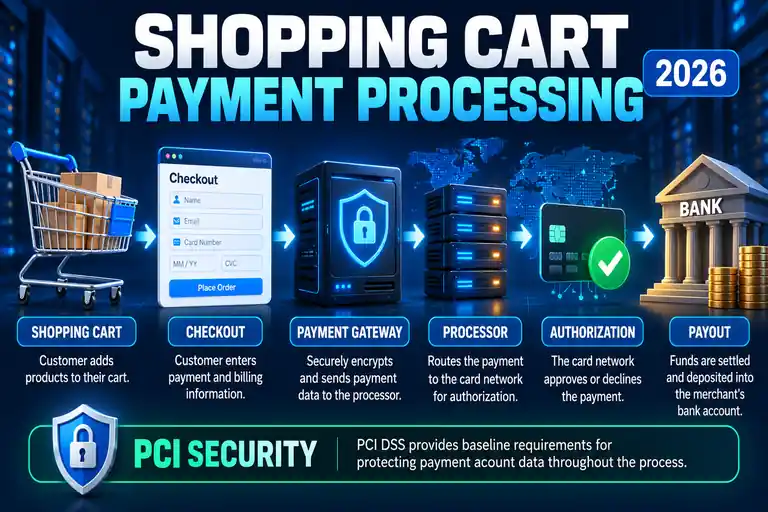
When a customer clicks the final checkout button, several systems may work together behind the scenes to authorize the payment and complete the online order.
The shopping cart manages the products and order information, while payment technology handles the financial transaction. Depending on the setup, that can involve a payment gateway, payment processor, card network, issuing bank and merchant or payment-provider account.
Understanding how those pieces fit together makes it easier to choose ecommerce software, configure checkout and troubleshoot payment problems.
See How Online Payments Work →
Quick answer: Your shopping cart creates the order and checkout experience. A payment gateway or integrated payment platform securely passes payment information into the processing system, authorization determines whether the transaction is approved, and settlement ultimately moves the funds to the merchant.
Shopping cart payment processing connects the customer's online checkout experience with the financial systems required to authorize and settle an electronic payment.
The exact process varies by ecommerce platform and payment provider, but the basic objective is the same: securely transmit the necessary payment information, request authorization, tell the store whether the payment succeeded and ultimately settle the funds.
How Does Shopping Cart Payment Processing Work?
A typical online card transaction can involve several stages.
| Stage | What Happens |
|---|---|
| 1. Shopping Cart | The store records the products, quantities and order total. |
| 2. Checkout | The customer provides the information required to complete the order. |
| 3. Payment Gateway | Payment information is securely transmitted into the payment-processing system. |
| 4. Processing | The transaction is routed through the appropriate payment infrastructure for authorization. |
| 5. Authorization | The payment is approved or declined. |
| 6. Settlement | Approved transaction funds are ultimately settled to the merchant according to the provider's process and schedule. |
To the shopper, much of this can happen in seconds. Behind the checkout page, however, multiple systems can be involved.
Building a WordPress Store? Bluehost Includes Ecommerce Hosting
If you're setting up shopping-cart payments on a WordPress website, you also need hosting capable of running the store and its checkout software.
Bluehost currently offers ecommerce hosting built around WordPress and WooCommerce. Its ecommerce platform includes WooCommerce, SSL and support for connecting payment gateways such as Stripe and PayPal.
That makes it relevant for a new store owner who wants to build the storefront, shopping cart and checkout on WordPress rather than using a completely separate hosted ecommerce platform.
Read our Bluehost WooCommerce Hosting Review for a closer look at its ecommerce hosting.
View Bluehost Ecommerce Hosting →
Affiliate disclosure: WebHostRanking may earn a commission if you purchase through our link, at no additional cost to you.
What Does the Shopping Cart Do?
The shopping cart and the payment processor aren't the same thing.
The shopping-cart software generally manages the ecommerce side of the order, including:
- Products
- Quantities
- Prices
- Discounts
- Shipping selections
- Taxes
- Customer information
- Order totals
When the shopper proceeds through checkout, the ecommerce system connects the order to the configured payment method.
If you're still choosing the ecommerce software itself, see our Best WordPress Shopping Cart Plugins guide.
What Is a Payment Gateway?
A payment gateway is technology that helps securely transmit payment information between the customer's checkout and the systems involved in processing the transaction.
Traditionally, ecommerce setups often treated the gateway as a distinct component between the shopping cart and payment processor.
Modern payment platforms can bundle several functions together, so a small business may not need to contract separately with a gateway, processor and individual merchant-account provider.
That is one reason payment terminology can be confusing: the underlying functions still exist even when one provider combines several of them into a single service.
What Is a Payment Processor?
The payment processor helps route transaction information through the financial networks required to authorize and process the payment.
For a card transaction, that can involve communication among the merchant's payment provider, card network and the bank that issued the customer's card.
The processor and gateway therefore perform different functions, although modern payment companies may package them together.
What Is a Merchant Account?
A merchant account is a specialized account involved in accepting electronic payments.
Historically, businesses accepting cards commonly established their own merchant account along with separate gateway and processing relationships.
That model still exists, but it is no longer the only option.
Modern payment facilitators can allow businesses to accept payments without establishing a traditional individual merchant account of their own. The payment provider manages more of the underlying infrastructure while the merchant uses the provider's platform.
This distinction is important when comparing payment services. Two companies may both let you accept credit cards while using very different account structures behind the scenes.
Merchant Account vs Payment Gateway
| Component | Primary Function |
|---|---|
| Shopping Cart | Manages products, order details and the ecommerce checkout process. |
| Payment Gateway | Securely passes payment information into the processing system. |
| Payment Processor | Routes and processes transaction information through the payment ecosystem. |
| Merchant Account | A specialized account structure used to accept and settle card payments in traditional processing models. |
| Payment Facilitator | Can provide an integrated way for businesses to accept payments without establishing a conventional individual merchant account. |
What Happens When a Customer Clicks “Place Order”?
Although implementations vary, a simplified card-payment transaction works something like this:
- The customer completes the shopping cart and proceeds to checkout.
- The customer enters or selects a payment method.
- The payment information is securely transmitted through the payment integration.
- The transaction is routed for authorization.
- The card issuer evaluates the authorization request.
- An approval or decline response travels back through the payment system.
- The ecommerce platform receives the transaction result.
- If approved, the store confirms the order.
- The transaction later proceeds through clearing and settlement.
- Funds are ultimately paid out according to the merchant's payment-provider arrangement.
The authorization response is fast, but authorization and final settlement are not the same event.
Authorization vs Settlement
Authorization asks whether the payment should be approved.
Settlement is the later financial process through which an approved transaction is cleared and funds are transferred according to the parties' payment arrangements.
This explains why an ecommerce store can immediately show an order as successfully paid even though the money has not yet appeared in the merchant's bank account.
Does Every Online Store Need a Traditional Merchant Account?
No.
Businesses can use payment platforms that combine payment-processing functions and allow merchants to accept online payments without opening their own traditional merchant account.
Other businesses may prefer a more traditional merchant-services arrangement.
The appropriate structure can depend on:
- Transaction volume
- Business type
- Risk profile
- Countries and currencies
- Payment methods
- Integration requirements
- Pricing structure
- Account-control requirements
For a small ecommerce business, an integrated payment provider can make setup substantially simpler.
What Is PCI DSS?
PCI DSS stands for Payment Card Industry Data Security Standard.
The PCI Security Standards Council describes PCI DSS as baseline technical and operational requirements intended to protect payment account data.
The standard applies to entities that store, process or transmit cardholder data or sensitive authentication data, as well as entities that can affect the security of the cardholder-data environment.
For an ecommerce merchant, the exact compliance requirements depend on how payments are implemented.
Hosted Checkout Can Reduce Payment-Data Exposure
One approach is to have a PCI DSS-compliant payment provider host the elements that collect payment information.
This can reduce the amount of payment-card data handled directly by the merchant's own systems.
However, outsourcing payment collection does not mean a merchant can ignore website security. A compromised ecommerce website can still be manipulated to redirect customers or interfere with the checkout experience.
The PCI Security Standards Council also has specific eligibility requirements for the different self-assessment questionnaire categories, so merchants should not assume that using a third-party payment service automatically determines their compliance scope.
Never Store Card Security Codes After Authorization
Payment-card security codes such as CVV, CVC and CID are classified as sensitive authentication data.
PCI DSS prohibits storing those card-verification values after authorization—even if they are encrypted.
Online stores should use properly designed payment integrations rather than attempting to create their own database of sensitive payment credentials.
Your Website Still Needs HTTPS
An ecommerce website should use HTTPS throughout the customer experience.
Encryption helps protect information while it is transmitted between systems, but HTTPS is only one component of ecommerce security.
Store owners also need to keep the website, plugins, ecommerce software and server environment properly maintained.
See our How to Secure Your Website guide for broader website-security practices.
How Do You Choose a Shopping Cart Payment Setup?
Start with your business requirements rather than choosing a payment system based only on the lowest advertised transaction rate.
Consider:
- Which payment methods your customers expect
- Transaction and other applicable fees
- Payout schedules
- Countries and currencies supported
- Recurring-payment requirements
- Refund management
- Chargeback handling
- Fraud-management tools
- Ecommerce-platform compatibility
- Checkout experience
- Technical integration requirements
- Customer support
For many small businesses, ease of integration and reliability can be just as important as small differences in processing rates.
Shopping Cart Payments and Checkout Abandonment
The payment process also affects conversion.
If shoppers don't trust the checkout, can't use their preferred payment method, encounter technical errors or face a confusing payment form, some will leave before finishing the purchase.
That means payment processing isn't only a back-office financial issue. It is part of the customer experience.
See our How to Reduce Shopping Cart Abandonment guide for ways to reduce unnecessary checkout friction.
Does Hosting Matter for Shopping Cart Payments?
Hosting does not replace the payment gateway or processor, but the ecommerce website still depends on its hosting environment.
The server has to deliver product pages, maintain the shopping-cart experience, run ecommerce software and communicate reliably with external payment services.
Slow or unstable hosting can therefore interfere with the overall checkout experience even when the payment processor itself is functioning correctly.
For WordPress ecommerce stores, Bluehost's current WooCommerce hosting includes ecommerce tools, SSL and payment-gateway integrations.
You can also read our Bluehost WooCommerce Hosting Review before choosing a plan.
Frequently Asked Questions
What is shopping cart payment processing?
Shopping cart payment processing is the process that connects an ecommerce checkout with the systems needed to authorize and settle an electronic payment.
Is a shopping cart the same as a payment gateway?
No. The shopping cart manages products, quantities and order information. A payment gateway or integrated payment service handles the secure transmission of payment information into the processing system.
Do I need both a payment gateway and a merchant account?
Not necessarily as separate services. Traditional setups may use a separate gateway and merchant account, while integrated payment platforms can combine multiple payment functions and allow businesses to accept payments without opening their own conventional merchant account.
What is the difference between a payment gateway and a processor?
The gateway primarily handles the secure transmission of payment information from the checkout into the payment system. The processor helps route and process the transaction through the financial networks required for authorization and settlement. Modern providers may combine these functions.
What does PCI DSS mean for an online store?
PCI DSS establishes security requirements for protecting payment account data. The specific obligations for a merchant depend on how its ecommerce and payment systems handle or affect cardholder data.
Should my website store customers' credit card numbers?
Small ecommerce businesses generally benefit from using established payment services rather than directly building systems to store sensitive card data. The exact PCI DSS scope depends on the implementation.
Can I store a customer's CVV number?
No. PCI DSS prohibits storing card-verification codes such as CVV, CVC or CID after authorization, even if they are encrypted.
Does Bluehost process the customer's credit card payment?
Bluehost provides the hosting and ecommerce environment. The actual payment transaction is handled through the payment gateway or payment service connected to the WooCommerce store.
Final Thoughts
Shopping cart payment processing is easier to understand once you separate the major functions.
The shopping cart manages the order. The checkout collects the necessary customer information. The payment gateway or integrated payment platform securely connects checkout to the payment infrastructure. The transaction is then authorized, and approved funds ultimately move through settlement.
Modern payment platforms can combine several of these functions, which is why a small ecommerce business may not need to establish separate relationships with a gateway, processor and traditional merchant-account provider.
If you're building the store itself on WordPress, our WordPress Shopping Cart guide covers the ecommerce software side, while our Bluehost WooCommerce Hosting Review covers one hosting option for running the store.