
SiteGround vs Hostinger 2026: Which Web Host Is Better?
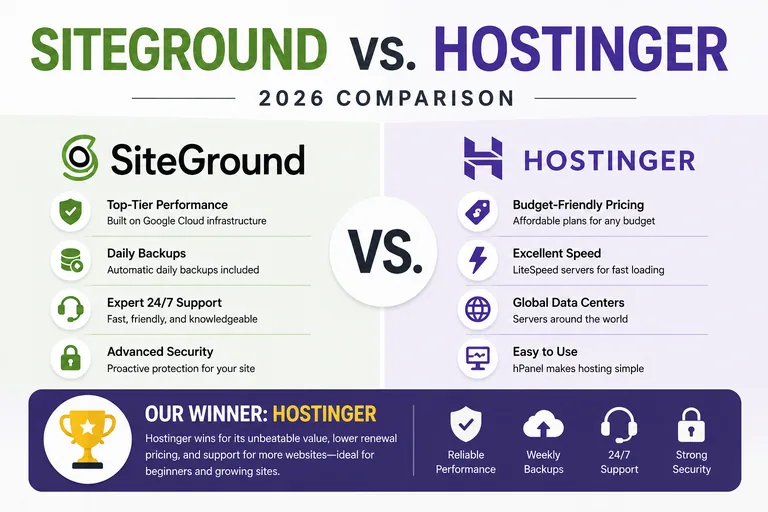
SiteGround vs Hostinger is a matchup between a feature-rich managed hosting platform and one of the most aggressively priced modern web hosts.
SiteGround excels with managed WordPress tools and advanced features. Hostinger combines low long-term introductory pricing, hPanel, AI tools and increasingly generous hosting plans.
Our pick: Hostinger for value; SiteGround for users who specifically need its managed WordPress workflow.
Quick Answer: Hostinger is our overall choice for most beginners and budget-conscious website owners, while SiteGround is the stronger option for established WordPress sites that need daily backups, advanced caching, staging and more managed hosting tools. Choose Hostinger for affordability; choose SiteGround when its additional WordPress features justify the higher renewal cost.
SiteGround vs Hostinger: Pros and Cons
| Host | Pros | Cons |
|---|---|---|
| SiteGround | Strong managed WordPress tools, daily backups, excellent caching, staging on qualifying plans | Higher renewal pricing and no cPanel |
| Hostinger | Low introductory pricing, easy hPanel dashboard, strong WordPress tools, free migration | Lowest pricing generally requires a long prepaid term and it does not use cPanel |
SiteGround vs Hostinger: Which Is Better?
Hostinger is our overall winner for most beginners and budget-conscious website owners, while SiteGround is the stronger option for users who need more advanced managed WordPress features.
Both providers offer capable WordPress hosting, but they target different priorities.
Hostinger combines competitive introductory pricing with an easy-to-use hPanel dashboard and a strong set of WordPress features. SiteGround costs more over the long term but provides excellent caching, daily backups, staging on qualifying plans and additional tools for more experienced WordPress users.
SiteGround vs Hostinger Quick Comparison
| Feature | SiteGround | Hostinger |
|---|---|---|
| Best For | Advanced WordPress users | Beginners & budget hosting |
| Control Panel | Site Tools | hPanel |
| WordPress | Excellent | Excellent |
| Free SSL | Yes | Yes |
| Backups | Daily automated backups | Weekly or daily depending on plan |
| Staging | Available on qualifying plans | Available on qualifying plans |
| Our Overall Winner | Best for advanced WordPress | ✓ Hostinger |
Hosting pricing, features and promotional terms can change. Verify current plan details before purchasing.
SiteGround vs Hostinger Pricing
Pricing is one of the biggest differences between SiteGround and Hostinger.
Hostinger is positioned more aggressively as a low-cost hosting provider, particularly during the introductory term. Its lowest advertised prices generally require a longer prepaid commitment.
SiteGround also offers discounted introductory pricing, but its regular renewal rates are significantly higher. That makes SiteGround harder to justify for someone who only needs basic hosting.
The additional cost becomes easier to justify when you're actively using SiteGround's daily backups, staging, caching and advanced WordPress tools.
For users primarily concerned with affordability, Hostinger is one of the providers included in our Best Cheap Web Hosting 2026 comparison.
Pricing winner: Hostinger.
SiteGround vs Hostinger for WordPress
Both providers offer strong WordPress hosting.
Hostinger provides managed WordPress functionality, automatic migration, free SSL, CDN features and an approachable dashboard. For most new WordPress websites, that combination provides everything needed to get started.
SiteGround goes further in several areas. Its managed WordPress environment includes strong caching technology, daily backups and staging functionality on qualifying plans.
Hostinger is better for a typical beginner. SiteGround is better for users who will take advantage of advanced WordPress management features.
We compare both providers with other leading hosts in our Best WordPress Hosting 2026 guide.
Which Is Easier to Use?
Both companies use proprietary hosting dashboards rather than cPanel.
Hostinger's hPanel is designed around simplicity. Website, domain, email, WordPress, backup and security functions are organized through a modern interface that works well for beginners.
SiteGround uses Site Tools, which is also well designed but exposes more advanced hosting functionality.
Neither interface is difficult to learn, but Hostinger gets our edge for someone managing a website for the first time.
Ease-of-use winner: Hostinger.
SiteGround vs Hostinger Performance
Performance is one of SiteGround's strongest categories.
SiteGround combines server-level optimization with caching, CDN functionality and WordPress performance tools. Its higher plans also provide additional server resources.
Hostinger offers global data center choices, CDN functionality and NVMe storage on qualifying plans, making it a strong performer for its price.
For a normal new website, either provider can deliver good performance when WordPress is properly optimized. For a more demanding site, SiteGround's performance stack gives it an advantage.
Performance winner: SiteGround.
SiteGround vs Hostinger Backups
SiteGround includes daily automated backups as a core part of its hosting platform.
Hostinger's backup frequency depends on the plan. Lower-tier hosting can include weekly backups, while higher plans provide daily backup functionality.
If daily backups are an important requirement without moving to a higher hosting tier, SiteGround has the advantage.
Backup winner: SiteGround.
SiteGround vs Hostinger Staging
Staging allows you to test WordPress changes on a private copy of your website before applying them to the live site.
Both providers offer staging functionality on qualifying plans, but SiteGround's staging tools fit particularly well with its overall managed WordPress environment.
For website owners who regularly test themes, plugins or significant site changes, SiteGround gets our edge.
Staging winner: SiteGround.
SiteGround vs Hostinger Security
Both providers include free SSL and multiple layers of hosting security.
SiteGround puts substantial emphasis on server-level security and managed protection. Hostinger also provides security features designed to protect websites and hosting accounts.
Website owners should still keep WordPress, themes and plugins updated and maintain an independent backup of important websites.
Security winner: SiteGround by a small margin.
SiteGround vs Hostinger Customer Support
Both companies provide 24/7 customer support.
SiteGround has traditionally placed significant emphasis on support and provides priority assistance on qualifying higher-tier plans.
Hostinger focuses primarily on online support and integrates assistance into its hosting platform.
For experienced website owners dealing with more technical WordPress issues, SiteGround gets a slight advantage.
Support winner: SiteGround.
SiteGround vs Hostinger for Beginners
Hostinger gets our recommendation for most beginners.
The combination of lower introductory pricing, a simple dashboard and strong WordPress functionality makes it easier to justify for someone launching a first website.
SiteGround is also easy to use, but many beginners won't initially benefit from enough of its advanced functionality to justify the higher long-term cost.
Beginner winner: Hostinger.
SiteGround vs Hostinger for Small Business
Both providers can host a small-business WordPress website.
Hostinger makes sense for a new business that wants to keep hosting expenses low while still receiving the core features needed for a professional website.
SiteGround becomes more attractive for an established business where backups, staging, managed security and advanced WordPress tools are worth paying more for.
For a new small business, we lean Hostinger. For an established WordPress business site, we lean SiteGround.
Who Should Choose SiteGround?
Choose SiteGround if you:
- Manage an established WordPress website
- Want daily automated backups
- Regularly use WordPress staging
- Value advanced caching and performance tools
- Want a more managed hosting environment
- Are comfortable paying higher renewal prices for additional features
Read our SiteGround Review for a closer look at its WordPress features, pricing and renewal costs.
Who Should Choose Hostinger?
Choose Hostinger if you:
- Want to keep your initial hosting cost low
- Are launching your first WordPress website
- Prefer an easy-to-use hPanel dashboard
- Want free automatic website migration
- Don't need cPanel
- Want strong overall value without paying for advanced features you may not use
SiteGround vs Hostinger: Final Verdict
Hostinger wins our SiteGround vs Hostinger comparison for the typical beginner or budget-conscious website owner in 2026.
SiteGround wins several technical categories. Its daily backups, staging tools, caching and managed WordPress features make it an excellent option for established sites and more experienced WordPress users.
But Hostinger provides a better balance of affordability, usability and WordPress functionality for someone launching a new site.
Choose Hostinger for affordability and beginner-friendly hosting. Choose SiteGround when advanced WordPress tools, daily backups and managed features justify the higher long-term cost.
SiteGround vs Hostinger FAQ
Is SiteGround better than Hostinger?
SiteGround is better for some advanced WordPress users because of its daily backups, caching and staging tools. Hostinger is our preferred choice for most beginners and budget-conscious website owners.
Which is better for WordPress?
Both are strong WordPress hosts. Hostinger is particularly attractive for new and budget-conscious users, while SiteGround is stronger for advanced WordPress management.
Which is cheaper?
Hostinger generally has the advantage for budget hosting, especially during the introductory term. Always compare the full upfront cost and renewal pricing before purchasing.
Which is better for beginners?
We prefer Hostinger for beginners because of its combination of introductory pricing, simple hPanel dashboard and integrated WordPress tools.
Which has better backups?
SiteGround gets the advantage because daily automated backups are included as a core part of its hosting platform.
Do SiteGround and Hostinger use cPanel?
No. SiteGround uses Site Tools, while Hostinger uses its proprietary hPanel dashboard.
Do both hosts include free SSL?
Yes. Both SiteGround and Hostinger include free SSL with qualifying hosting plans.
Which host would we choose?
For a new budget-conscious WordPress website, we would choose Hostinger. For an established WordPress site where daily backups, staging and advanced managed tools are priorities, we would seriously consider SiteGround.
Affiliate Disclosure: WebHostRanking.com may receive compensation if you purchase SiteGround through links on this page. This does not increase the price you pay. We currently cover Hostinger editorially and do not use an affiliate link for it. Hosting pricing, features and promotional terms can change, so verify current details before purchasing.